

Understanding product data
What product data actually is, the pieces every product is made of, the file formats it travels in, and how it moves in and out of the platform.
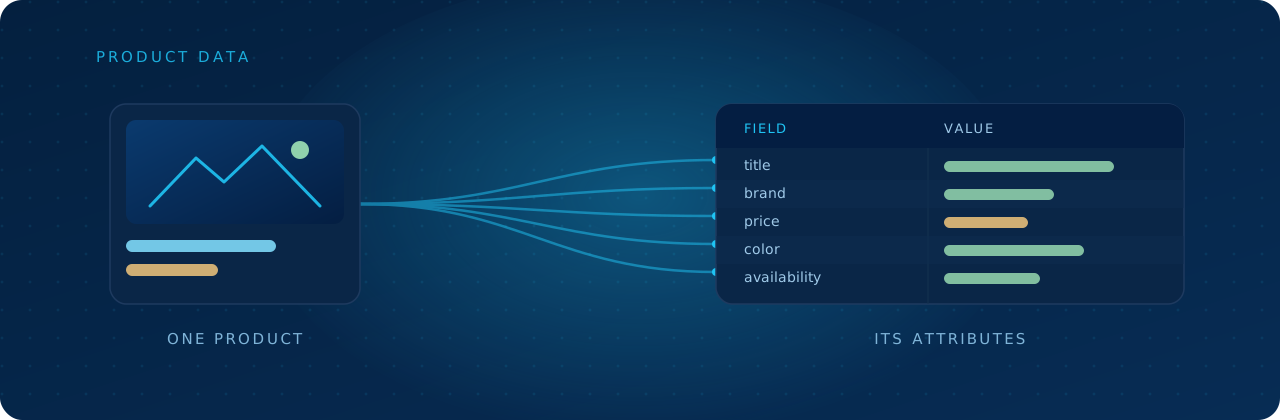
Before you import, map, or export anything, it helps to know what you're actually working with. Product data sounds technical, but it's a simple idea once you picture it. This page walks through what product data is made of, the file formats it shows up in, and how it gets in and out of Productsup.
What "product data" really means
Product data is all the information that describes a product. Nothing fancier than that.
Think of a single pair of running shoes in an online store. Behind the photo and the "Add to cart" button sits a pile of facts: the name, the brand, the price, the sizes, the color, what it's made of, the link to the image. Put those facts together and you've got that product's data.
One product is easy to picture. The trouble is scale. A normal catalog has thousands or even millions of products, and every one of them needs to show up correctly everywhere it's sold, whether that's a Google ad, an Amazon listing, or a retailer's site. Productsup exists to manage all of that at once, so the right facts reach the right place in the right format.
Attributes: the building blocks
Each single fact about a product is called an attribute. An attribute is two things paired together: a field (what the fact is) and a value (the fact itself).
If product data were a spreadsheet, and that's a genuinely useful way to picture it, then each column is a field and each cell holds a value:
| Field | Value |
|---|---|
| title | Trail Runner GTX, Men's |
| brand | Northpeak |
| price | 149.00 EUR |
| color | Slate / Cyan |
| availability | in stock |
Read down a column and you see one kind of fact for every product. Read across a row and you see everything known about one product. Almost everything you'll do in Productsup comes back to working with these fields and values.
The kinds of attributes you'll meet
Not every attribute behaves the same way, and channels treat them differently. It helps to recognize a few broad types:
- Identifiers. Values that uniquely name a product, like an ID, a GTIN or barcode, or an MPN. This is how systems tell one product from another.
- Descriptive attributes. The human-facing stuff: title, description, brand, color, material. These help shoppers and search engines understand the product.
- Commercial attributes. Price, sale price, currency, availability. These change often and have a big say in where and how a product shows up.
- Media attributes. Links to images and videos. Channels tend to be picky about size, format, and quality.
- Categorization. The product type or category, which tells a channel where the product belongs in its catalog.
Why identifiers matter most
Of all the attributes, the unique identifier is the one to get right first. It's the thread that ties the same product together across every system: your shop, Productsup, and each channel you sell on.
When an identifier is stable and consistent, a channel can confidently match an update to the right product, whether that's a price change, a stock update, or a new image. When identifiers go missing or keep changing, systems lose track of which product is which. That's the root cause of a surprising number of feed problems.
Why structure matters
Two catalogs can hold the exact same facts and still behave completely differently, depending on how those facts are structured. One channel expects a single size field. Another wants sizes split into their own rows. One wants price as 149.00 EUR, another wants the amount and the currency in separate fields.
Here's the key idea to carry into the rest of the platform: your data rarely shows up in the shape every channel wants. Knowing what your data is made of is step one. Reshaping it to fit each destination is what the rest of Productsup helps you do.
The file formats product data travels in
Product data has to live in a file format so systems can read and write it. You'll run into four common ones. They all hold the same kind of information, but they're built differently, and that affects what they're good at.
CSV
A plain table of rows and columns, with values separated by commas. It's the simplest format there is. The first line names the fields, and every line after it is one product:
id,title,brand,price,color,availability
TR-GTX-42,Trail Runner GTX,Northpeak,149.00 EUR,Slate,in stock
TR-GTX-43,Trail Runner GTX,Northpeak,149.00 EUR,Cyan,out of stock| Advantages | Disadvantages |
|---|---|
| Easy to read, edit, and open in almost anything | Only handles flat tables, so no nesting |
| Small file size, fast to process | No built-in way to mark data types or structure |
| Works with practically every tool | Commas, quotes, and line breaks inside values cause breakage |
CSV is also the most performant format to import and export. It carries the least verbose overhead and the simplest structure, so there's less for the platform to parse on the way in and less to build on the way out.
Best when your data is a clean, flat table and you want something lightweight.
JSON
A text format that stores data as key-value pairs. It's the default language of most modern APIs. At its simplest, it's flat, one value per field, just like a CSV row:
{
  "id": "TR-GTX-42",
  "title": "Trail Runner GTX",
  "brand": "Northpeak",
  "price": "149.00 EUR",
  "color": "Slate",
  "availability": "in stock"
}But JSON's real strength is nesting. A field can hold a list (the square brackets) or an object (the curly braces), so one product can carry its own price object, a list of images, and a list of variants:
{
  "id": "TR-GTX",
  "title": "Trail Runner GTX",
  "brand": "Northpeak",
  "price": { "amount": 149.00, "currency": "EUR" },
  "images": [
    "https://example.com/tr-gtx-slate.jpg",
    "https://example.com/tr-gtx-cyan.jpg"
  ],
  "variants": [
    { "sku": "TR-GTX-42", "size": 42, "color": "Slate", "availability": "in stock" },
    { "sku": "TR-GTX-43", "size": 43, "color": "Cyan", "availability": "out of stock" }
  ]
}| Advantages | Disadvantages |
|---|---|
| Handles nesting and hierarchy with ease | Harder for non-technical people to read and edit by hand |
| Plays naturally with web APIs and apps | Larger than CSV for the same flat data |
| Keeps data types like numbers and true/false | Easy to break with a missing bracket or comma |
Best for complex, nested data and anything moving through an API.
XML
A tagged text format where every value sits inside labeled tags. It's older, verbose, and still everywhere in retail and feed specs. Flat, it's one tag per field:
<product>
  <id>TR-GTX-42</id>
  <title>Trail Runner GTX</title>
  <brand>Northpeak</brand>
  <price>149.00 EUR</price>
  <color>Slate</color>
  <availability>in stock</availability>
</product>Like JSON, XML can also nest. Tags hold other tags, so a list becomes repeated child tags and an object becomes a tag with its own attributes or children:
<product>
  <id>TR-GTX</id>
  <title>Trail Runner GTX</title>
  <brand>Northpeak</brand>
  <price amount="149.00" currency="EUR" />
  <images>
    <image>https://example.com/tr-gtx-slate.jpg</image>
    <image>https://example.com/tr-gtx-cyan.jpg</image>
  </images>
  <variants>
    <variant sku="TR-GTX-42" size="42" color="Slate" availability="in stock" />
    <variant sku="TR-GTX-43" size="43" color="Cyan" availability="out of stock" />
  </variants>
</product>| Advantages | Disadvantages |
|---|---|
| Handles deep nesting and complex structures | Very wordy, so files get large fast |
| Can be strictly validated against a schema | Harder to read with all the tags |
| Long-standing standard many channels still require | Slower to process than CSV or JSON |
Best when a channel's spec demands it or you need strict validation.
JSON and XML can both nest data, and that's where the work hides. When a channel doesn't support nested structures, the hardest part is flattening that data back into plain rows and columns it can read. These formats also carry more overhead to read and write than CSV, simply because their structure is more complex.
Why nested data is harder to import
Nesting also makes data harder to bring in automatically, not just send out. Productsup works in flat lists of attributes, so importing nested JSON or XML means flattening it into columns, and there's rarely one obvious way to do that. Every nested piece is a decision. Take that list of images: it could land as a single images column with comma-separated URLs, or as separate enumerated fields like image_1, image_2, image_3. Both are valid. Which one is right depends on your data and what the channels downstream expect.
That's why understanding the data you actually have matters so much before you import a single row. If you're unsure how a feed is structured or how best to bring it in, you can work with a Productsup implementation specialist to evaluate your data and map out the right approach.
Tip
Some JSON and XML feeds are genuinely complex, with deep nesting or structures that don't map cleanly to rows and columns. In those cases it can be worth putting the business logic into a custom connector, which can interpret the structure and ingest the data in the best possible shape rather than forcing a one-size-fits-all flatten.
Excel (XLS / XLSX)
A spreadsheet file, the same thing you'd open in Excel or Google Sheets. Closely related to CSV, but with extra spreadsheet features baked in.
| Advantages | Disadvantages |
|---|---|
| Familiar and friendly for non-technical people | A proprietary format, not plain text |
| Supports multiple sheets, formatting, and formulas | Heavier and slower to process at scale |
| Great for manual review and quick edits | Formulas and formatting can mangle raw data |
Best when a human needs to eyeball or hand-edit the data.
API vs. flat files
Beyond the format, there's the question of how the data actually moves. You've got two broad options, and they apply to both importing data into Productsup and exporting it out.
A flat file is a file you hand over: a CSV, XML, or spreadsheet that gets uploaded, fetched from a URL, or dropped on an FTP server. An API connection is a live, direct link between two systems that pass data back and forth on request, no file in the middle.
| Flat files | API | |
|---|---|---|
| How it works | A file is produced, then picked up | Systems talk directly, on demand |
| Freshness | As fresh as the last file run | Can be near real time |
| Setup effort | Low, mostly point at a file | Higher, needs credentials and config |
| Best for | Big batch updates, simple setups | Frequent changes, live stock and pricing |
| Feedback | Little to none | Channels can report back on what they received |
Neither one is "better." Flat files are simple and great for big batch updates that don't change minute to minute. APIs shine when data changes constantly and you want updates to land fast, like live inventory or pricing. Plenty of setups use both: a flat file for the bulk catalog, an API for the fast-moving fields.
In short
Product data is a set of attributes, fields paired with values, that describe each product. Identifiers keep products distinct, and structure decides whether a channel can use what you send. That data travels in formats like CSV, JSON, XML, and Excel, and it moves either as flat files or over live API connections, depending on how fresh it needs to be.
How is this guide?