

Export delta connector
Send only the products that changed since the last run.
An export-delta connector works like an export connector, but instead of sending all products to the channel every run, it determines which products to send based on what changed since the last run. The platform tracks product data statuses between runs and provides four separate input streams — new, modified, unchanged, and deleted — so your connector can perform the appropriate action for each product (create, update, skip, or delete).
Use export-delta when the third-party channel supports incremental updates — it's more efficient and reduces API calls.
Data flow
ProductsUp platform → Container API (4 delta streams) → Your connector → Third-party channel
                                                               ↓
Container API (feedback) → ProductsUp platformInstead of a single input file, the Container API provides four streams based on what changed:
| Stream | Description |
|---|---|
| New | Products added to the site since the last run |
| Modified | Products that changed since the last run |
| Unchanged | Products with no changes since the last run |
| Deleted | Products removed since the last run |
How it works at runtime
- The platform starts your Docker container and passes export settings as environment variables
- Your code reads products from one or more of the four delta streams
- For each product, you perform the appropriate action on the third-party channel (create, update, skip, or delete)
- You write feedback for each product that failed
- You send progress notifications to the ProductsUp notification panel
- Exit with code
0(success) or non-zero (failure) - The platform imports the feedback file as a data source on the next site run
Reading delta input
Each stream has its own methods for iterating and counting.
Iterate by stream
// New products — create them on the channel
foreach ($this->containerApi->yieldFromNewFile() as $product) {
    $this->createOnChannel($product);
}

// Modified products — update them on the channel
foreach ($this->containerApi->yieldFromModifiedFile() as $product) {
    $this->updateOnChannel($product);
}

// Unchanged products — usually skipped
foreach ($this->containerApi->yieldFromUnchangedFile() as $product) {
    // No action needed in most cases
}

// Deleted products — remove them from the channel
foreach ($this->containerApi->yieldFromDeletedFile() as $product) {
    $this->deleteFromChannel($product);
}
Iterate in batches
Each stream also supports batch iteration:
foreach ($this->containerApi->yieldBatchFromNewFile(100) as $batch) {
    $this->createBatchOnChannel($batch);
}

foreach ($this->containerApi->yieldBatchFromModifiedFile(100) as $batch) {
    $this->updateBatchOnChannel($batch);
}
Count items per stream
$newCount = $this->containerApi->countItemsFromNewFile();
$modifiedCount = $this->containerApi->countItemsFromModifiedFile();
$unchangedCount = $this->containerApi->countItemsFromUnchangedFile();
$deletedCount = $this->containerApi->countItemsFromDeletedFile();
Writing feedback
Same as export connectors — write feedback for the products you could not export, choosing whichever fields help diagnose the failure. The platform imports the feedback file as an additional data source on the next site run.
$this->containerApi->appendToFeedbackFile([
    'id'      => $product['id'],
    'error'   => 'rejected_by_channel',
    'message' => 'Missing required attribute: gtin',
]);Each export destination can have at most one feedback file. See Feedback as an additional data source for how connection columns work.
Category Specific Attributes
Some export channels use Category Specific Attributes (CSA) — attribute sets that vary per product category. Use listClassifications() to retrieve the configured classifications, then pass classification-id to the new, modified, and unchanged yield methods.
Reading from the main channel
Reading from the main channel works exactly like a standard export-delta:
foreach ($this->containerApi->yieldFromNewFile() as $product) {}
foreach ($this->containerApi->yieldFromModifiedFile() as $product) {}
foreach ($this->containerApi->yieldFromUnchangedFile() as $product) {}
foreach ($this->containerApi->yieldFromDeletedFile() as $product) {}
Reading per classification
Same methods, with classification-id passed as an option:
$classifications = $this->containerApi->listClassifications();

foreach ($classifications as $classification) {
    foreach ($this->containerApi->yieldFromNewFile(['classification-id' => $classification->id()]) as $product) {}
    foreach ($this->containerApi->yieldFromModifiedFile(['classification-id' => $classification->id()]) as $product) {}
    foreach ($this->containerApi->yieldFromUnchangedFile(['classification-id' => $classification->id()]) as $product) {}
}
The deleted stream has no per-classification variant — deleted products are tracked in a single channel-wide file. yieldFromDeletedFile() and yieldBatchFromDeletedFile() return 404 Not Found with the message No valid read iterator found. when passed a classification-id. Read deleted products once, from the main channel.
Batch iteration works the same way — classification-id is the second argument:
foreach ($this->containerApi->yieldBatchFromNewFile(100, ['classification-id' => $classification->id()]) as $batch) {}A channel has CSA enabled when it carries the category_specific_export_is_parent tag (value 1) set via the Export Template Management API. You assign CSA-enabled channels to your connector the same way as regular channels — in the Export configuration step in the Dev Portal.
Logging and notifications
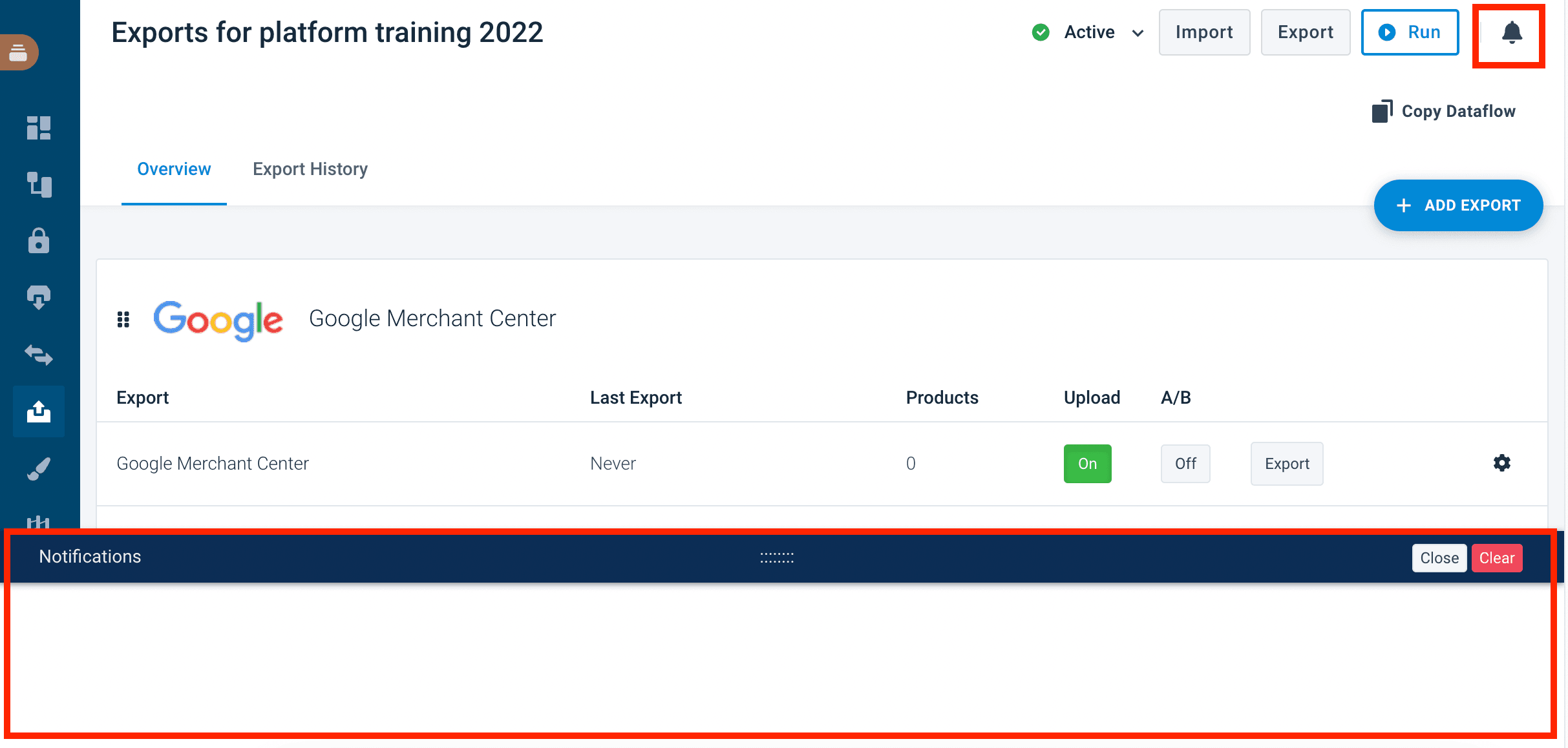
Use log methods for operational messages visible in the Dev Portal run logs. Use notifications for end-user-facing messages that appear in the ProductsUp notification panel. End-users see notifications in a collapsible panel at the bottom of their site view:
// Logging — visible in Dev Portal run logs
$this->containerApi->info("Processing 50 new, 20 modified, 5 deleted products.");
$this->containerApi->warning("Product {$id} not found on channel, skipping delete.");
$this->containerApi->error("Channel API returned 500 for product {$id}.");

// Notifications — visible to end-users in the ProductsUp notification panel
$this->containerApi->sendNotification('success', 'Delta export completed: 75 products processed.');
$this->containerApi->sendNotification('warning', 'Delta export completed with 3 errors.');Available log levels: debug, info, notice, warning, error, critical, alert, emergency.
Available notification levels: info, notice, warning, error, success.
Example service
A minimal export-delta service that processes each delta stream, writes feedback, and reports progress:
<?php

namespace App\ExportDelta\Service;

use Productsup\CDE\ContainerApi\ContainerApiInterface;

readonly class ExportDeltaService
{
    public function __construct(
        private ContainerApiInterface $containerApi,
    ) {}

    public function run(): void
    {
        $newCount = $this->containerApi->countItemsFromNewFile();
        $modifiedCount = $this->containerApi->countItemsFromModifiedFile();
        $deletedCount = $this->containerApi->countItemsFromDeletedFile();

        $this->containerApi->info("Delta export: {$newCount} new, {$modifiedCount} modified, {$deletedCount} deleted.");

        $errorCount = 0;

        $errorCount += $this->processStream(
            $this->containerApi->yieldFromNewFile(),
            fn(array $product) => $this->createOnChannel($product),
        );

        $errorCount += $this->processStream(
            $this->containerApi->yieldFromModifiedFile(),
            fn(array $product) => $this->updateOnChannel($product),
        );

        $errorCount += $this->processStream(
            $this->containerApi->yieldFromDeletedFile(),
            fn(array $product) => $this->deleteFromChannel($product),
        );

        $totalProcessed = $newCount + $modifiedCount + $deletedCount;

        if ($errorCount > 0) {
            $this->containerApi->sendNotification('warning', "Delta export completed with {$errorCount} errors out of {$totalProcessed} products.");

            return;
        }

        $this->containerApi->sendNotification('success', "Delta export completed: {$totalProcessed} products processed.");
    }

    private function processStream(\Traversable $stream, \Closure $action): int
    {
        $errorCount = 0;

        foreach ($stream as $product) {
            try {
                $action($product);
            } catch (\Throwable $e) {
                $errorCount++;

                $this->containerApi->warning("Failed to process product {$product['id']}: {$e->getMessage()}");

                $this->containerApi->appendToFeedbackFile([
                    'id'      => $product['id'],
                    'error'   => 'send_failed',
                    'message' => $e->getMessage(),
                ]);
            }
        }

        return $errorCount;
    }

    private function createOnChannel(array $product): void { /* Your create API call */ }
    private function updateOnChannel(array $product): void { /* Your update API call */ }
    private function deleteFromChannel(array $product): void { /* Your delete API call */ }
}
Export vs. export delta
| Export | Export delta | |
|---|---|---|
| Input | All products every run | Only products that changed |
| Streams | 1 (input) | 4 (new, modified, unchanged, deleted) |
| Best for | Channels that expect a full feed | Channels that support incremental updates |
| Efficiency | Processes everything every time | Only processes changes |
Your connector type must match the input it requests. An export connector requesting new or modified input, or an export-delta connector requesting full input, will cause an error.
Configuration
Export-delta connectors share the same type-specific configuration as export connectors: channels, feedback file, and category-specific attributes.
See Type-specific config for details.
Next steps
- Export connector — if you need full-feed exports instead
- Container API reference — full API for reading delta input and writing feedback
How is this guide?