

Data source connector
Fetch data from external systems and import it into the ProductsUp platform.
A data source connector fetches product data from an external system — an API, a file, a database — and writes it into the ProductsUp platform via the Container API. It runs during the import phase of a site run.
Within ProductsUp, data sources fall into two categories:
- Main data sources contain the core product catalog with standard attributes like product identifiers, titles, descriptions, pricing, and sizing.
- Additional data sources supply supplementary attributes that enrich the product feed, such as color, material composition, and delivery timeframes.
A data source connector can serve as either type — end-users decide how to use it when they add it to a site.
Data flow
External system → Your connector → Container API (output) → ProductsUp platformYour connector has no input from the platform. It generates or fetches data on its own and writes it to the Container API output file.
How it works at runtime
- The platform starts your Docker container and passes configuration as environment variables
- Your code fetches data from the external source
- You process the retrieved data, restructuring nested or complex formats into flat product rows
- You write products to the Container API output
- You send progress notifications to the ProductsUp notification panel
- Exit with code
0(success) or non-zero (failure, e.g. authentication issues, unreachable API) - The platform processes the output file and merges it with data from other sources on the site
Writing output data
The Container API provides several methods for writing product data. Each product is a flat associative array.
Write a single product
$this->containerApi->appendToOutputFile([
    'id' => '1',
    'name' => 'Product A',
    'price' => '9.99',
]);
Write multiple products at once
The most common approach. The SDK automatically chunks large batches to stay within API limits.
$products = [
    ['id' => '1', 'name' => 'Product A', 'price' => '9.99'],
    ['id' => '2', 'name' => 'Product B', 'price' => '19.99'],
    ['id' => '3', 'name' => 'Product C', 'price' => '29.99'],
];

$this->containerApi->appendManyToOutputFile($products);
Stream from a generator
Memory-efficient for large datasets. The SDK handles chunking internally.
$this->containerApi->streamToOutput($this->fetchProducts());Where fetchProducts() is a generator that yields product arrays:
private function fetchProducts(): \Generator
{
    // Fetch from API, file, database, etc.
    foreach ($this->apiClient->getProducts() as $product) {
        yield [
            'id' => $product->getId(),
            'name' => $product->getName(),
            'price' => $product->getPrice(),
        ];
    }
}
Logging and notifications
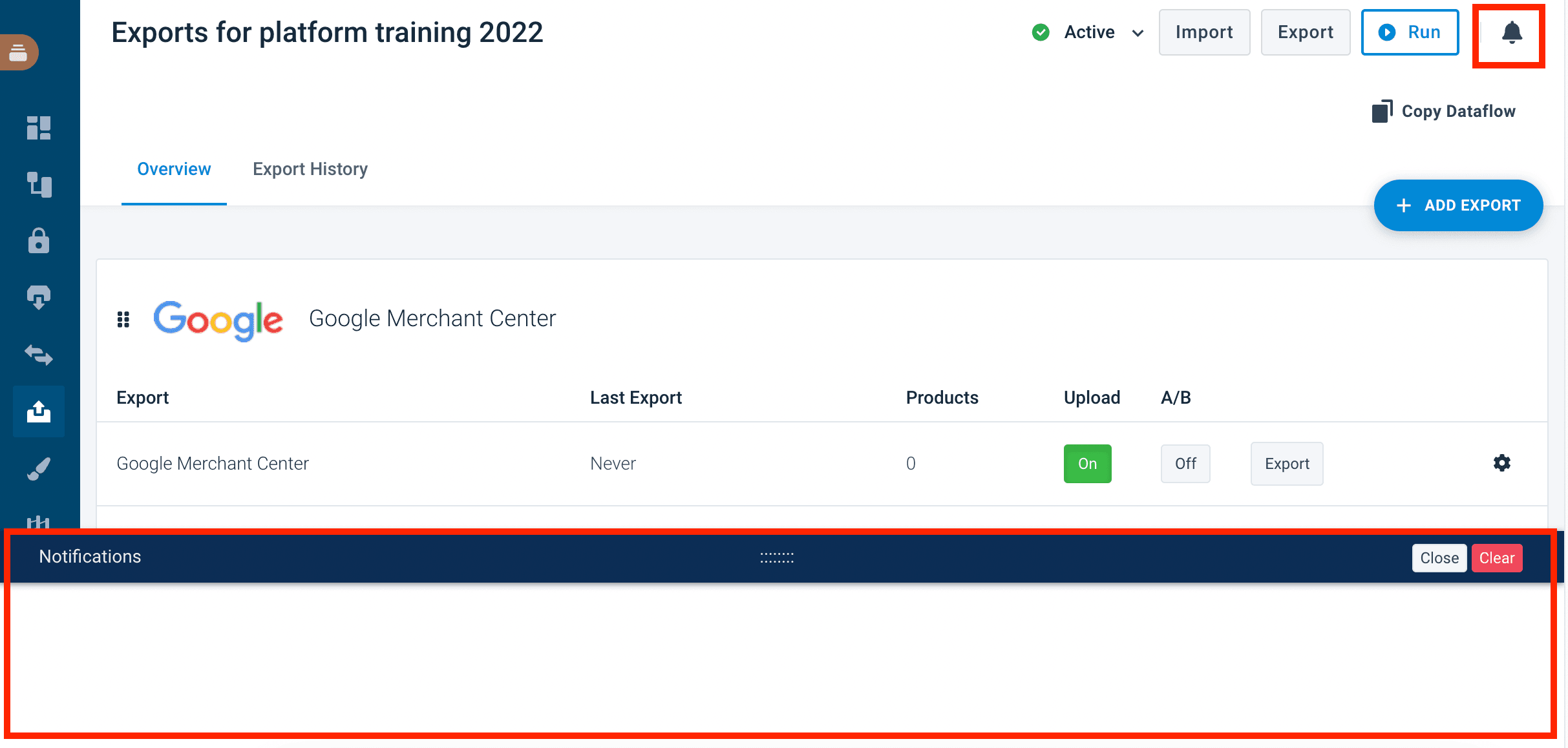
Use log methods for operational messages visible in the Dev Portal run logs. Use notifications for end-user-facing messages that appear in the ProductsUp notification panel. End-users see notifications in a collapsible panel at the bottom of their site view:
// Logging — visible in Dev Portal run logs
$this->containerApi->info('Starting product import.');
$this->containerApi->warning('API returned partial data, retrying.');
$this->containerApi->error('Failed to authenticate with external API.');
$this->containerApi->debug('API response: ' . json_encode($response));

// Notifications — visible to end-users in the ProductsUp notification panel
$this->containerApi->sendNotification('success', 'Import completed: 1500 products imported.');
$this->containerApi->sendNotification('warning', 'Import completed but 3 products had missing fields.');
$this->containerApi->sendNotification('error', 'Import failed: external API is unreachable.');Available log levels: debug, info, notice, warning, error, critical, alert, emergency.
Available notification levels: info, notice, warning, error, success.
Example service
A minimal data source service that fetches products, writes them to the platform, and reports progress:
<?php

namespace App\DataSource\Service;

use Productsup\CDE\ContainerApi\ContainerApiInterface;

readonly class ImportService
{
    public function __construct(
        private ContainerApiInterface $containerApi,
    ) {}

    public function run(): void
    {
        $this->containerApi->info('Starting product import.');

        $products = $this->fetchFromApi();

        $this->containerApi->appendManyToOutputFile($products);

        $this->containerApi->info('Imported ' . \count($products) . ' products.');
        $this->containerApi->sendNotification('success', 'Import completed: ' . \count($products) . ' products imported.');
    }

    private function fetchFromApi(): array
    {
        // Your real data source logic here — API call, file read, database query, etc.
        return [
            ['id' => '1', 'name' => 'Product A', 'price' => '9.99'],
        ];
    }
}You can find this example in the quickstart repository under src/DataSource/.
Configuration
Data source connectors have one type-specific configuration: categories. Categories organize your connector in the platform marketplace (e.g. "Shopping platform", "Shop systems", "Custom import").
See Type-specific config for all available categories.
Next steps
- Quickstart — build and deploy a data source connector end-to-end
- Container API reference — full API for writing output data
- Demo connectors — clone and deploy a working data source connector
How is this guide?