

AI Visibility dashboard
Monitor how your brand and products appear across AI engines like ChatGPT, Gemini, Perplexity, and Google AI Mode.
Shoppers increasingly turn to AI assistants such as ChatGPT, Gemini, Perplexity, and Google AI Mode to discover products and brands. The AI Visibility dashboard shows you how visible your brands and product categories are in these AI-generated answers, and helps you turn that insight into actions that improve your future performance.
The dashboard monitors how often your brands and categories appear across AI-generated responses, tracks the sentiment of those mentions, and lets you benchmark your performance against your main competitors.
How AI Visibility works
Instead of requiring you to create and maintain prompt sets, AI Visibility automatically tracks predefined shopping intents and aggregates visibility data into a single dashboard.
Built around shopper intents
Modern AI models understand the intent behind a question rather than its exact wording. The platform continuously evaluates how your brands and categories appear in the background across three shopper intents:
| Intent | Example question |
|---|---|
| Transactional | "Where can I buy this product?" |
| Best deal | "Where can I find the best price?" |
| Support and returns | "Which retailers offer the best service or return policies?" |
This keeps your setup focused on the parts of your business you already know, with no technical configuration required.
Supported AI models
The dashboard monitors your visibility across the following AI answer engines:
- ChatGPT
- Gemini
- Perplexity
- Google AI Mode
You can view your aggregated visibility across all models, or drill down into an individual model to understand differences in performance. Current monitoring focuses on organic AI results.
Set up AI Visibility
The AI Visibility dashboard is available on request. To get access, reach out to the Productsup Support team at support@productsup.com or your Customer Success Manager.
The initial dashboard is configured using your existing catalog data, providing a baseline view of your AI Visibility without requiring any configuration on your part.
When your workspace is first created, the platform needs a few days to gather its initial data, and about a week to provide week-on-week tracking data.
If needed, the setup can be customized to align with your business priorities. Together with your Productsup representative, you can define:
- Product categories to monitor across AI answer engines
- Priority brands that are most important to your business
- Key competitors to benchmark your AI Visibility against
As your business priorities evolve, your Productsup representative can update the monitored categories, brands, and competitors to keep your dashboard aligned with your goals.
Read the dashboard
The dashboard presents your AI Visibility as aggregated insights that you can filter and explore, and you can drill into any brand or category for a detailed view.
The platform refreshes AI Visibility data every 7 days. Each refresh adds to your historical record, so you can track how your visibility changes over time.
Visibility score
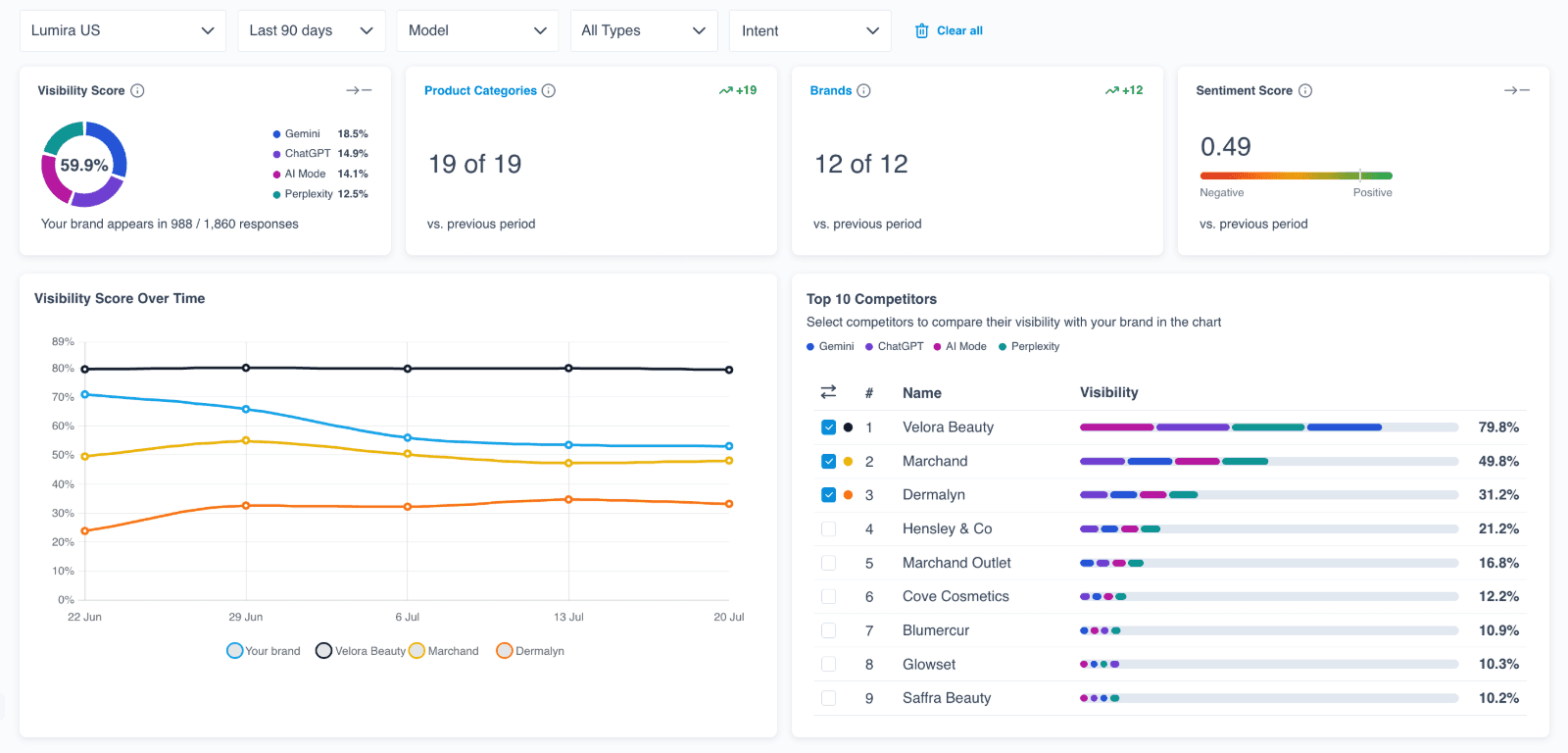
The Visibility Score shows how consistently your brand appears in AI-generated answers. It is the share of evaluated responses that mention your brand, for example your brand appearing in 1,879 of 11,234 responses. Alongside the score, the dashboard shows how many of your Product Categories and Brands are represented, and the Visibility Score Over Time chart tracks the score across each refresh, so you can see the effect of your optimizations.
The Visibility Score card also breaks your overall score down by AI model, so you can see how much each engine contributes without switching the model filter one at a time. The card shows each monitored model as its contribution, in percentage points, to your total visibility score. For example, a brand's visibility might come 45% from ChatGPT, 45% from Gemini, and 10% from Perplexity. The breakdown reflects the dashboard's active filters, so it updates when you adjust the time period, shopper intent, product category, brand, or selected models.
Filter your results
You can filter the dashboard to focus your analysis by:
- AI model, to focus on a single engine or compare all of them
- Shopper intent, to see performance for transactional, best deal, or support and returns questions
- Product category or brand, to focus on a specific part of your catalog
- Region and time period, to scope results to a market and date range
Sentiment
The Sentiment Score shows how AI models describe your brand, on a scale from negative to positive across all responses. Because each refresh records a new score, you can watch sentiment shift after you optimize your product content.
Competitor benchmarking
Define your competitor set, and the dashboard ranks who AI recommends most in your categories so you can see where your brand stands. The Top 10 Competitors view lists each competitor with their visibility, and you can select competitors to compare their visibility against your brand in the Visibility Score Over Time chart. The Top 10 Competitors view also breaks each competitor's visibility down by AI model, so you can see how much each engine contributes to their presence, the same way the breakdown appears for your own score.
Detailed brand and categories page
From the AI Visibility dashboard, select a brand or category in the Top Brands or Top Product Categories section to open the Detailed brand and categories page. This page lists every monitored brand or category, not only the top entries, and lets you filter and page through the full list to focus your analysis.
Select any row to open a detail panel alongside the list. The panel shows the selected brand or category with its Visibility Score and Sentiment Score, each with its trend against the previous period. It also lists the Top Competitors ranked by visibility. The panel groups the questions driving visibility into prompt cards by shopper intent — transactional, best deal, and support and returns — each with its own visibility score.
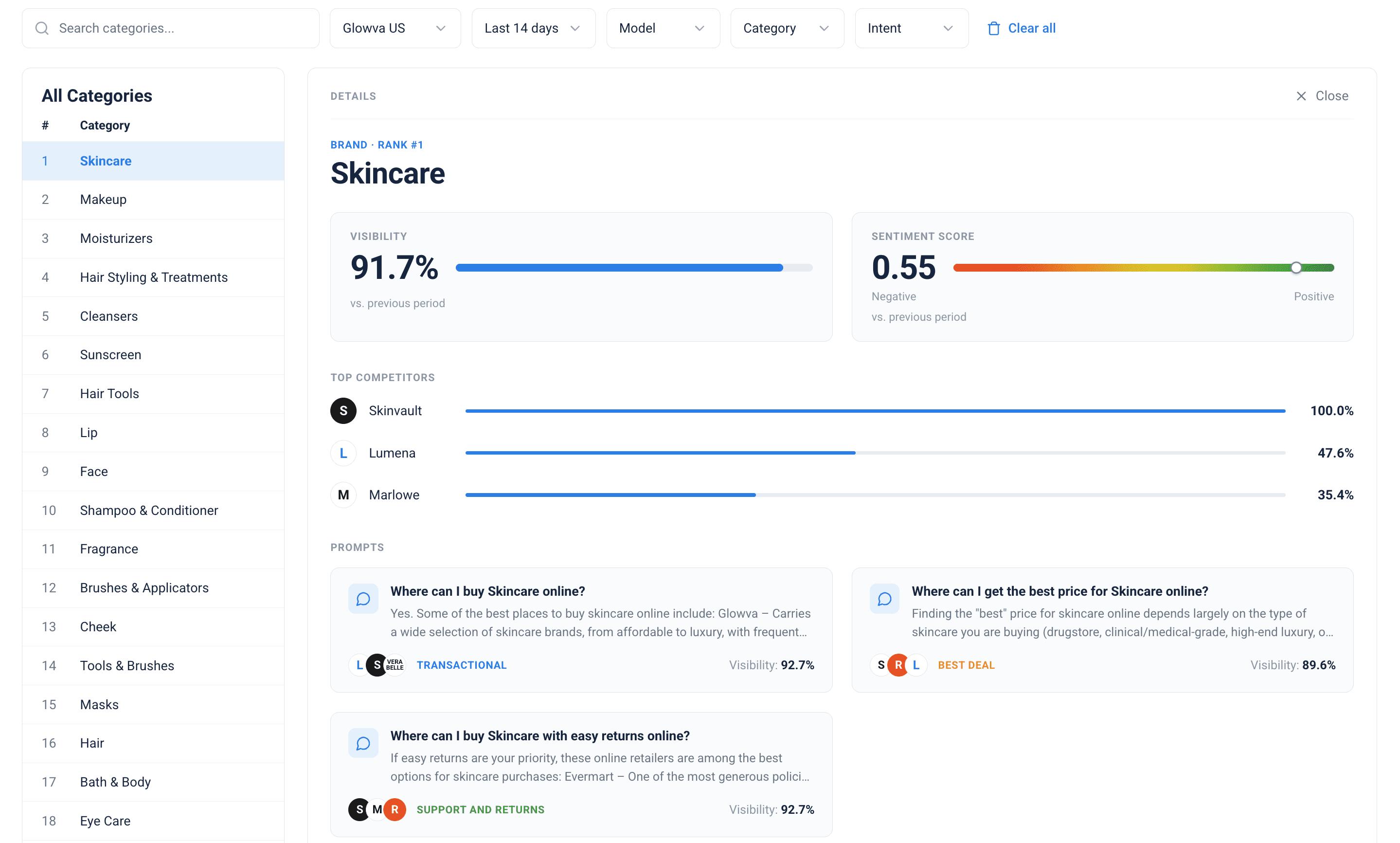
Select a prompt card to read the actual AI responses for that question. You can switch between AI models and scroll back through previous refreshes to see how each model's answer changes over time.
Turn insights into action
Knowing where your visibility is low is only the first step. Because the dashboard is built on top of your feed and catalog data, every metric is also available as raw data that you can combine with your catalog information inside Productsup.
This connection lets you move from monitoring to optimization by answering questions such as:
- Which categories have low AI Visibility?
- Which brands are underperforming?
- Are important product attributes missing?
- Is FAQ content available?
- Are product highlights populated?
- Are ratings and reviews being passed?
- Are conversational attributes present?
Instead of only showing you a problem, the dashboard helps you uncover why it exists and where to act.
Use visibility data beyond the dashboard
Your raw AI Visibility data is not isolated inside the dashboard. You can:
- Combine it with your catalog information
- Use it in Data View and Dataflow workflows
- Send it to your own or BI systems through the available export destinations
This lets you incorporate AI Visibility into your broader analytics and optimization strategies.
The AI Visibility feedback loop
The dashboard supports a continuous cycle that connects monitoring to catalog improvements:
- Monitor your brand and category visibility across AI answer engines.
- Identify weak areas and competitive gaps.
- Analyze your product data and content quality.
- Enrich your products with better attributes, FAQs, reviews, and highlights.
- Improve your future visibility across AI-generated answers.
Each refresh measures the effect of your changes, so you can repeat the cycle and continue to improve how your brands and products appear in AI-generated answers.
Related
How is this guide?