

User types and access rights
Learn about the three user types and their access rights in Productsup.
Introduction
There are two user types in Productsup:
- Admin
- User
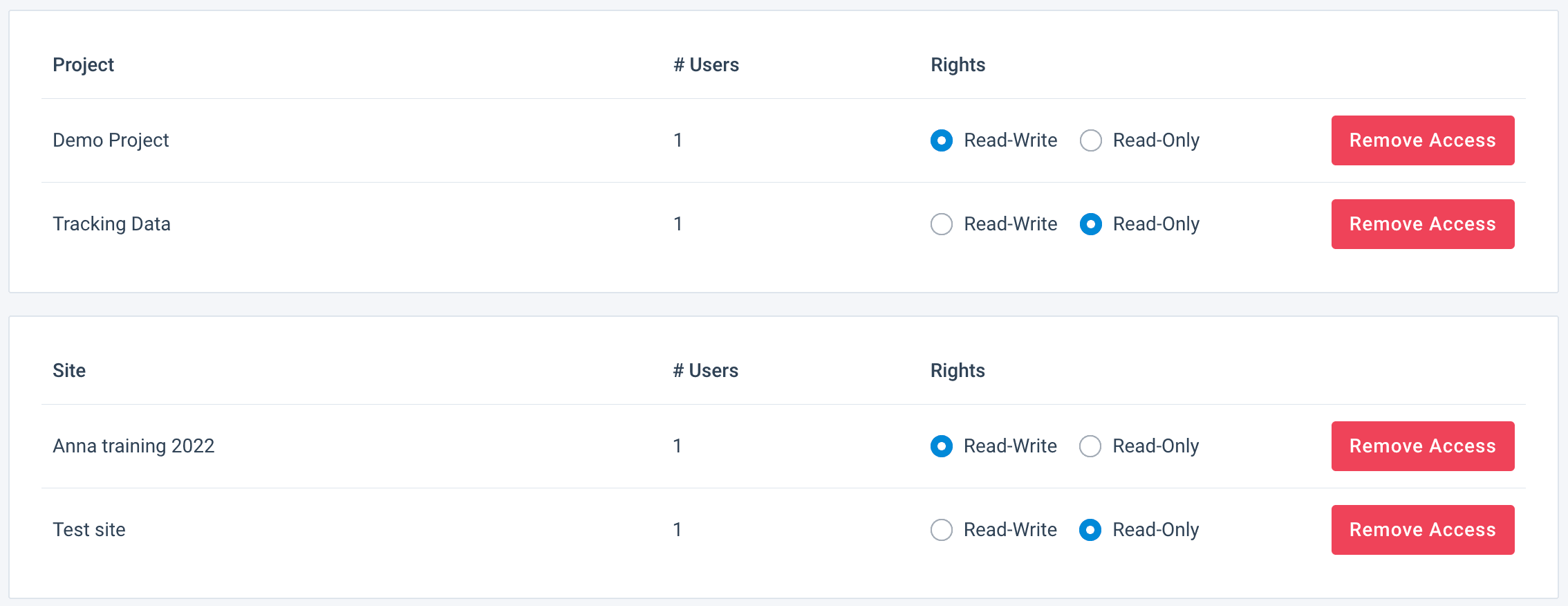
Users may have Read-Write or Read-Only access rights depending on the project or site they get access to.
Admins
Admins have the right to perform all actions within an organization. This includes:
- Accessing all projects and sites
- Creating, changing, and deleting all projects and sites
- Inviting and deleting users
- Providing users with access to sites or projects
- Specifying Read-Write or Read-Only access rights for users in each site or project
- Changing the rights of other administrators in the organization or demoting administrators to users.
Follow these steps to add new users if you are an administrator:
Go to User Management from your organization's main menu.
Select INVITE USERS in the top right-hand corner of the User Management page.
Add the email address(es) of those you wish to invite.
- You can add one email address per line to invite multiple users at once.
Select if your user should have Admin or User access.
- After making a selection, you can give them access to the appropriate sites or projects.
- When adding sites or projects, you should define whether access should be Read-Write or Read-Only.
Select Save.

To learn how to delete users or change user access rights, see Set up User Management.
Read-Write users
A Read-Write user has access to the projects or sites that an administrator has made available to them only. Such users have the right to change those projects or sites as needed:
- Edit site data
- View and use all features on the site level
- Create new sites
Read-Write users don't have the right to:
- Invite new users
- See the list of all users in an organization
- Assign additional access rights to themselves
The administrator grants the required access if a user needs access to additional sites or projects.
At the site level, a Read-Write user has access to these features:
- Dashboard
- Data Map
- Authentication
- Data Sources
- Data Services
- Exports
- Designer
- Scheduling
- Dataflow
- Data View
- Lists
- ROI Strategy
- Reporting
- Error Log
- Monitor
- Activity
- Tracking
- Settings
At the project level, Read-Write users have access to:
- Overview
- Authentication
- Reporting
- Reporting
- Settings
At the organization level, Read-Write users can access only Overview and Authentication.
Read-Only users
A Read-Only user has the right to view only the sites or projects that an administrator has made available to them and can't edit anything in the platform.
The administrator grants the required access if a user needs access to additional sites or projects.
Read-Only users have access to a restricted list of Productsup features. At the site level, Read-Only users can access these features:
- Dashboard
- Data Map
- Data Services
- Exports
- Data View
- Reporting
Read-Only users can't open any other site-level feature, not even to view it. The features that need Read-Write access are Authentication, Data Sources, Designer, Scheduling, Dataflow, Lists, ROI Strategy, Error Log, Monitor, Activity, Tracking, and Settings.
This means a Read-Only user can't view the Dataflow or the rule boxes in it. In Data View, a Read-Only user sees the attribute values, but the Edit panel on an attribute is disabled for them, so they can't inspect which rule boxes are applied to an attribute or how they are set up.
At the project level, Read-Only users have access to:
- Authentication
- Reporting
At the organization level, Read-Only users can access only Overview and Authentication.
How is this guide?