

Data View
Inspect, filter, and analyze channel readiness of your product data in Data View in Productsup.
2 min read
Introduction
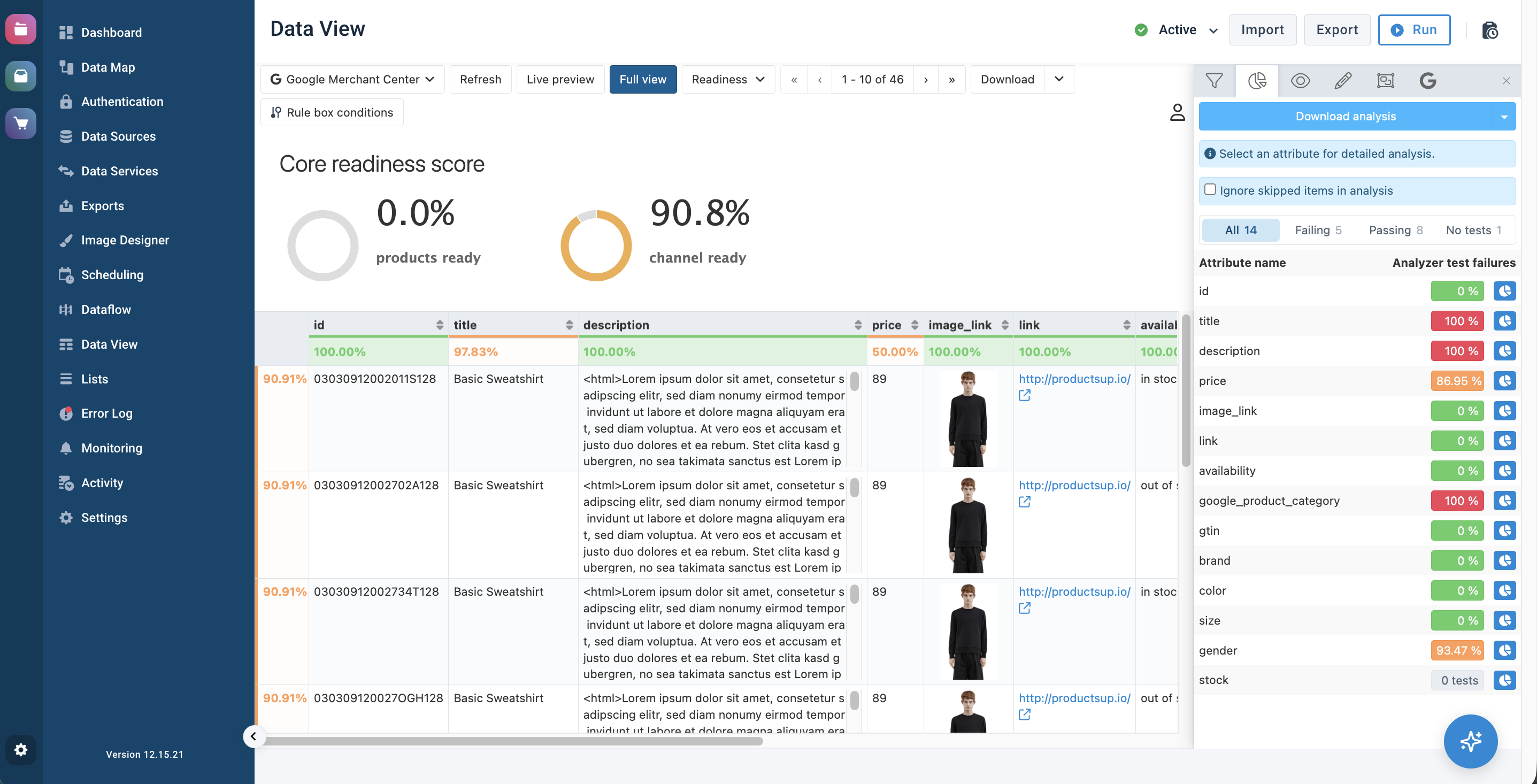
Data View is the platform area where you can view and edit your data with rule boxes and check whether it's ready and compliant for the export channels.
Tip
See Analyze your data in Data View to learn how to use Analyzer in Data View.
See Use Dataflow to map your attributes from import to export to learn how to map your data.
The upper ribbon on the Data View contains features that help you adjust your view:
- Export selection lets you select the import or intermediate stage or one of the exports added in Exports.
- Live Preview and Full View are two options to display the changes after applying a new mapping or editing data with rule boxes.
- Product number selector lets you customize the number of visible products per page.
- Download lets you download products from Data View into a CSV file.
- Rule Box Conditions lets you create and set up conditions to determine when the platform should apply rule boxes to an attribute.
- Menu icon opens the side panel that contains attribute visibility features that let you:
See First steps with Data View for how to use these features.
How is this guide?