

Authentication and secrets
Configure authentication providers and secret references for your connector.
Both steps are optional. Use authentication when your connector needs end-user credentials (OAuth tokens, API keys for a third-party service). Use secrets when your connector needs developer-managed credentials stored securely in a vault.
Authentication
Authentication lets you declare which authentication providers your connector requires. When an end-user adds your connector to a site, they select their credentials from the platform's authentication store.
How it works
- You (the developer) register one or more authentication types during connector setup. These reference pre-configured authentication providers on the ProductsUp platform (e.g. Google Merchant Center, Facebook, SFTP).
- End-users select which of their stored credentials to use when they configure your connector on a site.
- At runtime, the selected credentials are passed to your connector as environment variables with the prefix
PUP_AUTH_(in environment variable mode) or as CLI flags with the prefix--pup-auth-(in command options mode).
Example
If the authentication provider has a field refresh_token, your connector receives:
Environment variable mode:
PUP_AUTH_REFRESH_TOKEN=<value from user's authentication store>Command options mode:
--pup-auth-refresh_token='<value from user's authentication store>'When you add authentication registrations to a connector, the platform automatically creates an authentication_select field in the end-user form, letting users pick their credentials.
Secrets
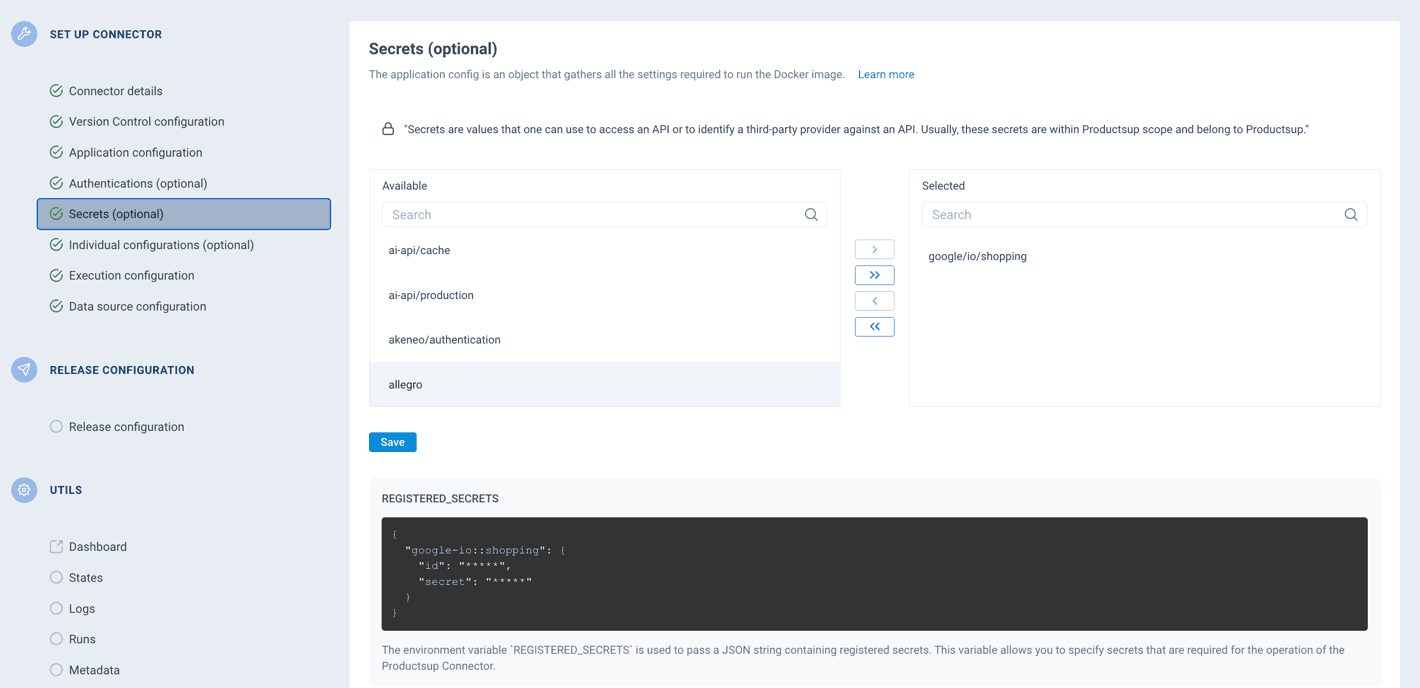
Secrets are sensitive values (API keys, service credentials, tokens) stored securely in a vault. Unlike authentication, secrets are managed by the connector developer or platform administrator — end-users don't interact with them.
How it works
- You (the developer) define secret registrations, each referencing a path in the vault and specifying which fields to extract.
- At runtime, all registered secrets are passed to your connector as a JSON string — either via the
REGISTERED_SECRETSenvironment variable or the--registered-secretsCLI flag, depending on the execution mode.
Secret registration structure
Each secret registration has three parts:
| Field | Description |
|---|---|
| Vault secret | The path to the secret in the vault. |
| INI header | A section name used to group the secret's fields. |
| Fields | The specific field names to extract from the secret (e.g. api_key, api_secret). |
When to use which
| Authentication | Secrets | |
|---|---|---|
| Who provides the values | End-users, via the authentication store | Developers or platform admins, via the vault |
| Use case | Third-party service credentials that vary per user (OAuth tokens, API keys) | Internal credentials shared across all instances of the connector |
| How values are delivered | Individual env vars / CLI flags with PUP_AUTH_ prefix | Single JSON string via REGISTERED_SECRETS |
| End-user interaction | Users select their credentials from a dropdown | None — users don't see secrets |
How is this guide?