

Connector details
Configure the basic details of your connector — name, type, description, and more.
The Connector details step is the first part of the setup wizard. You fill in these fields when creating a connector, and some can be edited afterward.
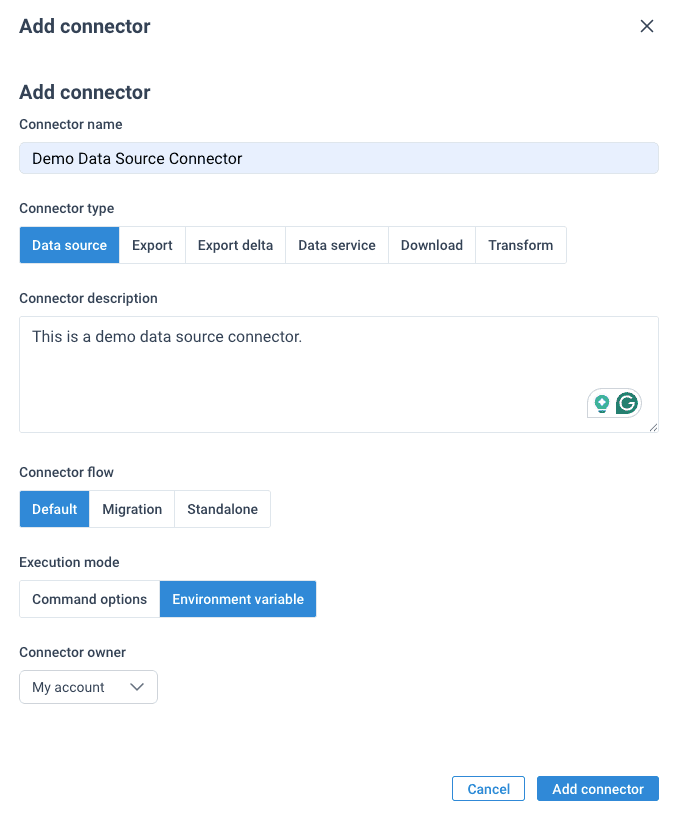
Fields
| Field | Required | Editable after creation | Description |
|---|---|---|---|
| Name | Yes | Yes | A human-readable name for the connector. Shown in the Dev Portal and in the ProductsUp platform when end-users add the connector to a site. |
| Type | Yes | No | The connector's role in the data pipeline. See Connector types for the full breakdown. |
| Description | No | Yes | A short description of what the connector does. Shown to end-users when they browse available connectors. |
| Flow | No | No | Controls how the connector integrates with the platform. Defaults to Default if not set. |
| Execution mode | No | No | How individual configurations are passed to your connector at runtime. Defaults to Environment variable if not set. See how configurations reach your code. |
| Owner | No | No | The organization that owns this connector. Defaults to your own organization. You must be a member of the organization you assign. |
| Readme | No | Yes | Additional documentation for the connector. Use this to provide setup instructions or usage notes for end-users. |
| Logo | No | Yes | An SVG image used as the connector's icon. Uploaded separately from the other fields. |
Type, Flow, and Execution mode are locked after creation and cannot be changed. Choose carefully — if you need a different value, you'll have to create a new connector.
Connector type
Determines what your connector does in the data pipeline. The most common types are:
| Type | Direction | Description |
|---|---|---|
| Data source | Inbound | Fetches data from an external source and imports it into ProductsUp |
| Export | Outbound | Sends all processed product data to a third-party channel every run |
| Export delta | Outbound | Sends only the data that changed since the last run |
Other types include data-service, download, transform, write, and upload. See Connector types for details on all types.
Connector flow
Controls how the connector integrates with the ProductsUp platform:
| Flow | Description |
|---|---|
| Default | The connector is assigned to dev and prod platform sites and can be synced to them. This is the standard flow for most connectors. |
| Standalone | The connector is not assigned to platform sites. Use this for connectors that run independently, without a site context. Available for all connector types. |
| Migration | Internal-only. Used for data migration connectors. Available for datasource, export, export-delta, and data-service types only. |
Not all flows are available for all connector types. The Dev Portal only shows flows that are valid for the selected type.
Execution mode
Determines how end-user configuration values (API keys, URLs, etc.) are passed to your connector at runtime:
| Mode | How it works |
|---|---|
| Environment variable | Values are passed as SNAKE_CASE environment variables. This is the recommended approach — it works with any language and framework. |
| Command options | Values are appended as --flag=value CLI arguments to your command. |
See Execution configuration for how to define which values are passed.
Logo
The connector logo is an SVG file that serves as the connector's icon in the ProductsUp platform. It's uploaded separately from the other fields via a dedicated upload button on the details page. Only SVG format is supported.
How is this guide?