

Activity Log in Pulse Score
Learn how Pulse Score checks whether a recent change to your site affected a slow rule box.
Coming soon
Pulse Score is currently available only to customers in the closed beta. It becomes available to all customers with its general release. If you encounter any issues while using it, contact support@productsup.com.
The Activity Log dimension of Pulse Score shows recent changes to your site and checks whether any of them affected a rule box that slows down processing. It helps you find out whether a recent change made your site slower. This dimension counts for 3.33% of the overall Pulse Score. See Check your site's health with Pulse Score for how the overall score is calculated.
Looking for the full history of changes to your site, project, or organization? See View your Activity Log and Summary.
Changes that the Activity Log dimension checks
The report lists up to the 50 most recent changes from Activity Log in the last 20 days, with the date, the person who made the change, and a description. People appear by their name, or as A user if the platform cannot find their name.
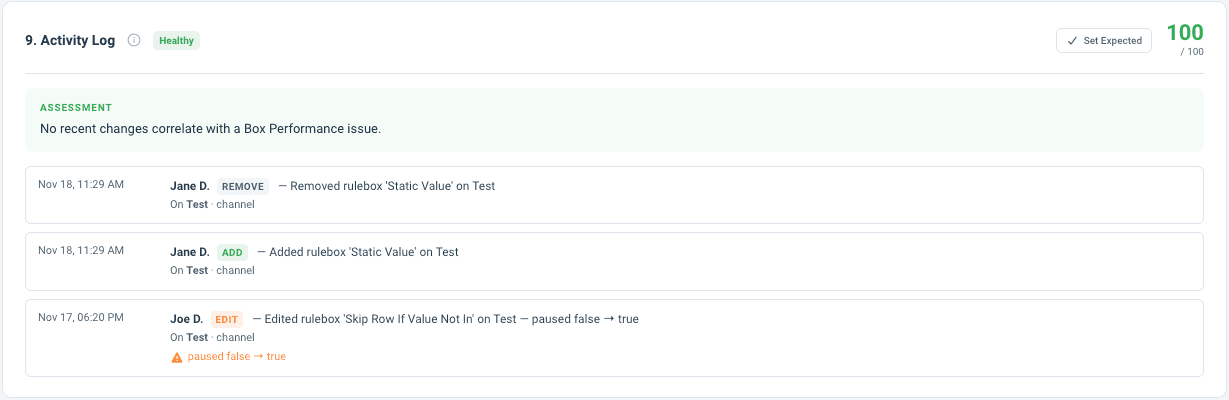
How the Activity Log score is calculated
A change is related to a slow rule box if it changed a rule box that the Dataflow / Box Performance dimension rated Slow or Very slow. Only changes to rule boxes count. Changes to connections between attributes do not.
Score = 100 minus 25 for each related change, with a minimum of 0. Each related change counts, even if several changes affected the same rule box.
| Score | Status |
|---|---|
| 80–100 | Healthy |
| 50–79 | Watch |
| 0–49 | At risk |
The platform does not assess this dimension, and leaves it out of the overall Pulse Score, if it could not read Activity Log.
What to do when Activity Log needs attention
Check the related changes in the list. If a change made a rule box slower, you can undo the change or adjust the rule box. See View your Activity Log and Summary for the full history of changes.
How is this guide?