

Monitoring Configuration in Pulse Score
Learn how Pulse Score checks whether your site has the four baseline monitoring alerts.
Coming soon
Pulse Score is currently available only to customers in the closed beta. It becomes available to all customers with its general release. If you encounter any issues while using it, contact support@productsup.com.
The Monitoring Configuration dimension of Pulse Score checks whether your site has the four baseline alerts that warn you when imports or exports fail or lose items. Without them, you may notice a problem only after it reaches your destinations. This dimension counts for 3.33% of the overall Pulse Score. See Check your site's health with Pulse Score for how the overall score is calculated.
Looking for how to set up alerts for failed imports or exports? See Set up Monitor for your feeds.
Baseline alerts that the Monitoring Configuration dimension checks
The dimension checks four baseline alerts:
- Import(s) failed
- Imported items decreased
- Export(s) failed
- Exported items decreased
A baseline alert counts if a monitor for it exists at the site, project, or organization level and is not snoozed. Which notification channel the monitor uses does not matter.
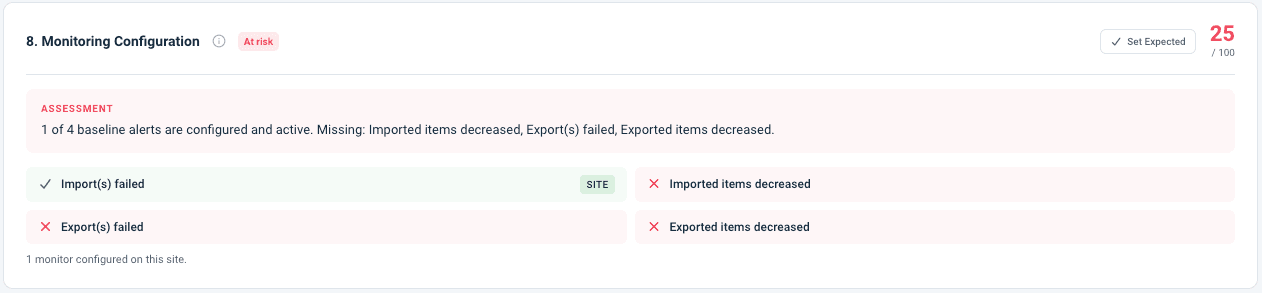
How the Monitoring Configuration score is calculated
| Baseline alerts covered | Score | Status |
|---|---|---|
| 4 of 4 | 100 | Healthy |
| 3 of 4 | 75 | Watch |
| 2 of 4 | 50 | Watch |
| 1 of 4 | 25 | At risk |
| 0 of 4, or no monitors at all | 0 | At risk |
The platform always assesses this dimension.
What to do when Monitoring Configuration needs attention
Add a monitor for each baseline alert that the assessment lists as missing. You can add it at the organization or project level to cover all sites below it. See Set up Monitor for your feeds and Monitor events overview.
How is this guide?