

Data Services in Pulse Score
Learn how Pulse Score checks whether the data services of your site ran slower than expected.
Coming soon
Pulse Score is currently available only to customers in the closed beta. It becomes available to all customers with its general release. If you encounter any issues while using it, contact support@productsup.com.
The Data Services dimension of Pulse Score checks whether any of the data services your site uses ran slower than expected in the latest completed run. A site can run data services at the import stage, at an intermediate stage, or at both, and the dimension checks all of them. A slow data service delays every step of the run that comes after it. This dimension counts for 13% of the overall Pulse Score. See Check your site's health with Pulse Score for how the overall score is calculated.
Data services that the Data Services dimension checks
The report lists each data service of the latest completed run with its duration, its start time, and its rating: Normal, Slow, Very slow, Not measured, or Didn't run. See Enhance your import data through Data Services for more information on data services.
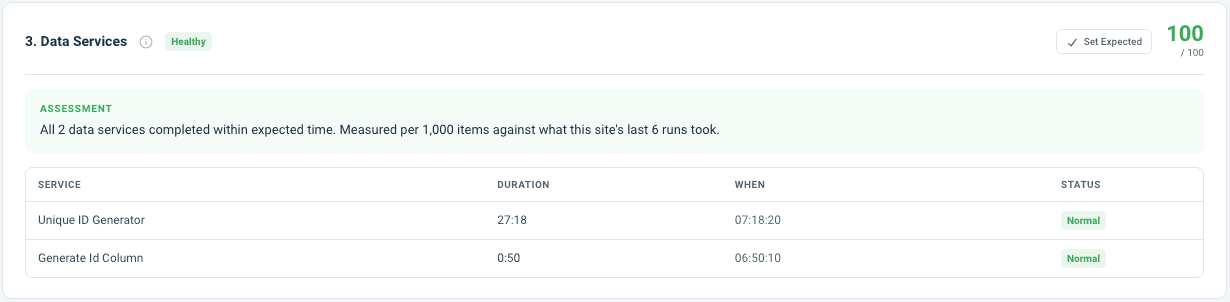
How a data service is rated
To compare runs with different numbers of items fairly, the platform calculates how many seconds a data service took per 1,000 imported items. For runs with fewer than 1,000 items, it uses the total duration. It then compares that value with the first available reference:
| Reference | When the platform uses it | Slow from | Very slow from |
|---|---|---|---|
| The same data service in this site's recent runs | The site has at least three earlier runs with this data service | 2 times its usual time | 4 times its usual time |
| The same data service across Productsup | The site has fewer than three earlier runs, and at least 10 organizations use the data service | 3 times its typical time | 6 times its typical time |
| Fixed limits | Neither reference is available, or the number of imported items is unknown | 60 seconds | 180 seconds |
The usual time is the median of the earlier runs, so one unusually slow run does not change it. When the platform compares with a reference, a data service must also lose a meaningful amount of time before it is flagged:
- A data service is flagged only if it reaches the Slow threshold of the reference and took at least 2 minutes longer than the reference.
- A flagged data service is Very slow if it reaches the Very slow threshold of the reference or took at least 30 minutes longer than the reference.
- A data service that takes less than 10 seconds is never flagged.
If the number of imported items is known, a data service must exceed the fixed limits both in total and per 1,000 items.
If a data service is fine compared with this site's own runs but takes at least twice as long as it typically does across Productsup, the assessment mentions it. This does not affect the score.
Data services that cannot be timed
The Data Services dimension shows a data service as Not measured when it started but did not finish in the log of the latest completed run, so the platform cannot tell how long it took. A Not measured data service counts like a Slow data service, because an unknown duration is not proof that the data service is healthy.
A data service that is set up for the site but does not appear in the log at all shows Didn't run. It may not have run this time, so the report lists it, but it does not affect the score.
How the Data Services score is calculated
The dimension follows the worst data service:
| Worst data service | Score | Status |
|---|---|---|
| At least one data service is Very slow | 40 | At risk |
| At least one data service is Slow or Not measured | 70 | Watch |
| All data services are Normal | 100 | Healthy |
If the site has no completed run yet, or the platform cannot read the run log, the dimension scores 100 with the status Healthy, because no data service could be measured. The platform leaves the dimension out of the overall Pulse Score only if it cannot reach the site's run history.
What to do when Data Services needs attention
Check the settings of the data service that the assessment names in Data Sources. If a data service takes a long time on every run, compare the time it takes with how much you need its result. See Enhance your import data through Data Services for the settings of each data service.
How is this guide?