

Error Log Report in Pulse Score
Learn how Pulse Score counts the errors and warnings of the last seven site runs that logged an error or warning.
Coming soon
Pulse Score is currently available only to customers in the closed beta. It becomes available to all customers with its general release. If you encounter any issues while using it, contact support@productsup.com.
The Error Log Report dimension of Pulse Score counts the errors and warnings of the last seven site runs that logged an error or warning. Runs without errors or warnings are skipped, so on a site that usually runs cleanly, these seven runs can cover a longer period. Errors are the most direct sign that something in your site is broken, so this dimension counts for 25% of the overall Pulse Score, more than any other dimension. See Check your site's health with Pulse Score for how the overall score is calculated.
Looking for the errors and warnings of your site and how to fix them? See Error log codes and troubleshooting overview.
Errors and warnings that the Error Log Report dimension checks
The dimension uses the same data as Error Log, so the numbers match what you see there. Errors that you added to the blacklist in Error Log do not count.
The platform groups messages by type, so the same error in several runs counts once. An error is a message that stopped the run or has the type error, fatal, or critical. Every other message is a warning. A message that appears in two or more of the seven runs is recurring. The report lists every message with its first and last occurrence and the number of runs it appeared in.
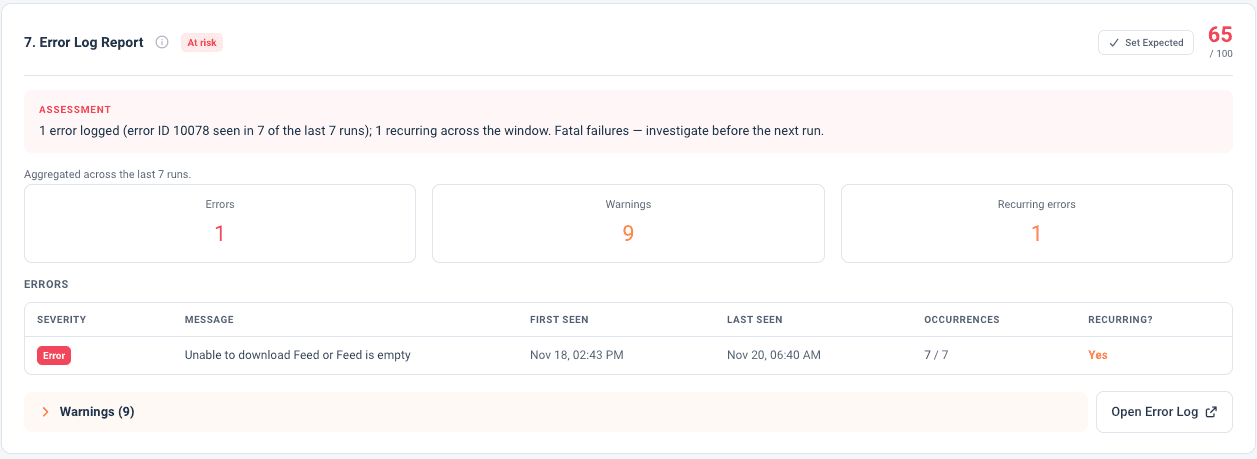
How the Error Log Report score is calculated
Only errors affect the score. Warnings and recurring messages appear in the report for context but do not change the score or the status.
| Errors in the last seven runs | Score | Status |
|---|---|---|
| None | 100 | Healthy |
| One or more types of error | 70 minus 5 for each type of error, with a minimum of 30 | At risk |
For example, three different types of error give a score of 55. Eight or more give the minimum score of 30.
If none of the site's runs logged an error or warning, the dimension scores 100 with the status Healthy.
What to do when Error Log Report needs attention
Fix the error that the assessment names first, because it occurred in the most runs. Select Open Error Log in the report to see all errors of the site. See Error log codes and troubleshooting overview for the meaning of each error.
How is this guide?