

Paused Sources & Inactive Exports in Pulse Score
Learn how Pulse Score checks how many of your data sources are paused and how many of your exports are inactive.
Coming soon
Pulse Score is currently available only to customers in the closed beta. It becomes available to all customers with its general release. If you encounter any issues while using it, contact support@productsup.com.
The Paused Sources & Inactive Exports dimension of Pulse Score checks how many of your data sources are paused and how many of your exports are inactive. A paused main data source means your site does not receive fresh product data, and an inactive export does not send any data to its destination. This dimension counts for 3.33% of the overall Pulse Score. See Check your site's health with Pulse Score for how the overall score is calculated.
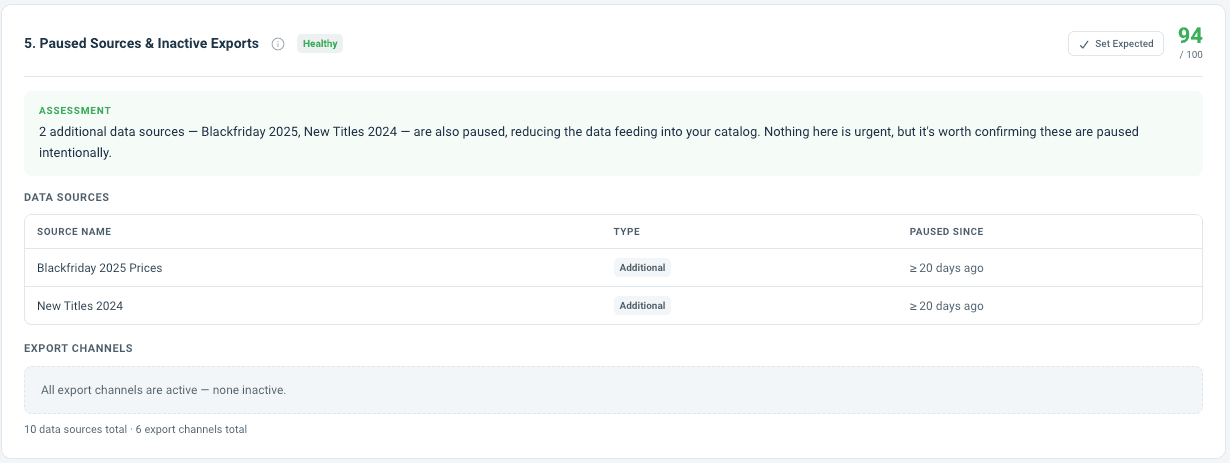
Data sources and exports that the Paused Sources & Inactive Exports dimension checks
The report lists each paused data source with its type and the date it was paused, and each inactive export with the date of its last upload. If a data source was paused more than 20 days ago, the report shows ≥ 20 days ago, because the platform's activity history covers the last 20 days.
How the Paused Sources & Inactive Exports score is calculated
The platform calculates the share of active items in three groups:
- Main data sources that are not paused
- Additional data sources that are not paused
- Exports that are active
A group that the site does not have counts as fully active. The platform weights main data sources twice as much as the other two groups, because a paused main data source usually means no data is flowing at all:
Score = (50% × share of active main data sources + 25% × share of active additional data sources + 25% × share of active exports) × 100, rounded to the nearest whole number.
For example, a site with its only main data source paused, and all additional data sources and exports active, scores 50.
| Score | Status |
|---|---|
| 80–100 | Healthy |
| 50–79 | Watch |
| 0–49 | At risk |
If the site has exports but none of them is active, nothing reaches any destination. In that case, the status is always At risk and the score is at most 30.
Pulse Score counts a paused data source or an inactive export even if you paused it on purpose. If that is the case, you can mark the dimension as expected. See Mark a dimension as Expected.
The platform always assesses this dimension.
What to do when Paused Sources & Inactive Exports needs attention
Check that every paused data source and inactive export in the list is paused on purpose. To resume a data source, see Add a main data source to import your products. To activate an export, see Export data feeds.
How is this guide?